Posts

Hard and Soft allocation of stock in SAP Business One

Image
When you require to allocate the stock in a particular item in the inventory, you must have a solution to do that. In different instances, companies need to allocate quantities for different requirements. In retail company needs to allocate identical items and their quantities in the Sales Order. In manufacturing company needs to allocate one set of raw materials for a particular production order. This requirement is satisfied with the Batch/Serial Allocation option in SAP Business One. Generally, there are two types of stock allocation Soft Allocation is the way of allocating the stock at the beginning based on the demand and supply of goods is flexible that results to change the allocation and demand. At the Sales Order level, we can use the soft allocation. Hard Allocation is the commitment between supply and demand that can't be changed because the allocation takes place at the final level. As an example, items have been finalized and ready to deliver or issue. How can we do th...

Understanding the ERP Implementation

Image
Most companies are looking for a system to integrate and automate business functions. But, they don't know about the definition of the ERP system and implementation. Please read our previous article about " Understanding the ERP system " which gives a basic understanding of the ERP and its behavior. Today we are discussing the ERP implementation and we are explaining the requirements for implementing an ERP system. When do you need an ERP system? Generally, startups and new companies don't have ERP systems. When they are growing and the numbers of transactions per day have been increased with daily business functions as long as more controls and integration are required, this is the time to look for an ERP solution because they can't manually record a bulk of transactions and they need an integrated business process with some area of automation. Before you go to the ERP system, what do you do first? Most organizations have ad-hoc operations and no Standard Operati...

Convenient Remote Access Solution for SAP Business One through Chrome Remote Desktop

Image
As the SAP Business One client, you require the Remote Access for SAP Business One Client and the Server to run the operation from outside the office. During the COVID-19 pandemic, most of the organizations enable the Work From Home option because SAP Users requires to access the system through their remote PC or Tables. However, SAP Business One has some in-built solutions to access the SAP Client remotely via web browsers like SAP Business One Browser Access Services and Web Client. But, those features have limitations over the conventional SAP Client Application. Hence, SAP Business One Client is the best solution to access and do all tasks in the system. For administrative tasks also can be carried out through client application only. Therefore SAP Business One Client is a vital application to run businesses operation.  What are the SAP proposed solutions for remote access? SAP has proposed Microsoft RDP and Citrix are solutions for remote access in SAP Business One Client....

What is the difference between Google Hangouts and Google Chat?

Image
As we know, google shows Google Chat and Google Hangouts both in Google Apps access area. Someone gets confused about which one should be used for messaging and video calling. Google has introduced a new instance of Hangout Chat called Google Chat consists of Google Workspace . The Google Workspac e is the new version of Google G Suite and it has more features than the G Suite. However, they have changed the product SKUs with a new lineup such as Business Starter, Business Standard, Business Plus, and Enterprise.  Changes in Hangouts along with the Google Workspace. Google has changed its Hangout Chat is to Google Chat and Hangout Meet is to Google Meet with the Google Workspace launch.    Hangouts If you are using the free Google services such as the personal account of Gmail with  @gmail.com, you have the classic Hangouts. Start Hangouts on the web at https://hangouts.google.com . Over time, if you were invited to chat by someone using Google Chat at work or s...

Convenient online meeting solution during the CORONA (Covid-19) epidemic

Image
As we all are requiring a stable solution to organize and conduct the meeting by keeping the travel restrictions. Hence, we need to have a convenient meeting solution from a trusted service provider is important. However, it is a challenge during this time because there are several solution makers and products are available in the market and we need to select a more convenient and cost-effective solution right now. Our selection is Google Meet is the more convenient approach than other products such as Zoom, MS Team, Skype, etc. Now you can simply arrange an online meeting through your Gmail and Calendar or using  https://meet.google.com/ link.  Why we select Google Meet? It takes the headaches out of joining a video call at work. Meet needs to just set up a meeting and share a link. No worrying about whether teammates, clients, or customers have the right accounts or plug-ins. With a fast, lightweight interface and smart participant management, multi-person video calls are a...

How to Create the PKCS12 file and including SSL Certificate and Key through OpenSSL

Image
When you are requiring to enable a secured connection for your web application or device that you need to have a PKCS12 file in order to encrypt and authenticate the data. Especially, in SAP Business One is required to have a PKCS12 certificate for its services such as SLD, Browser Access and Service Layer, etc. Refer to the below steps to generate .p12 file for SAP Business One installation.  Before moving to dive, let's clear doubts in major areas. What protocols are used to facilitate secured communication? Mainly there are two protocols such as SSL "Secure Sockets Layer" and TLS "Transport Layer Security" that are used to secure the connection and it enables data encryption, integrity, and authentication. How do you identify that data has not been read and has not been changed by someone? To overcome these problems, the SSL/TLS uses data encryption and digital signature to identify the sender and make sure data has not been changed. The encrypted data can...

What drives the business for success?

Image
Every business in the world is struggling to achieve success of the business. So, it is important to identify the success factors to drive the business for satisfying the customers. Speed Speed is the critical factor to deliver the right services to the customer. All the services should be tuned up at the right speed to reach the final destination. The current business context depends on speed and time to enable efficient service, and this makes the productivity of each aspect of the business process. Quality Quality is also a challenging factor for any business and without having a quality product or service can't be satisfied with the customer. The right quality means fitness for the purpose, and it drives to produce the relevant product/service for the customer.  The company Axleta is a solution maker for businesses who are requiring IT and Business Process Advancement. Axleta pledges to deliver quality service to their customers, and the customer's satisfaction depends on t...

Popular posts from this blog

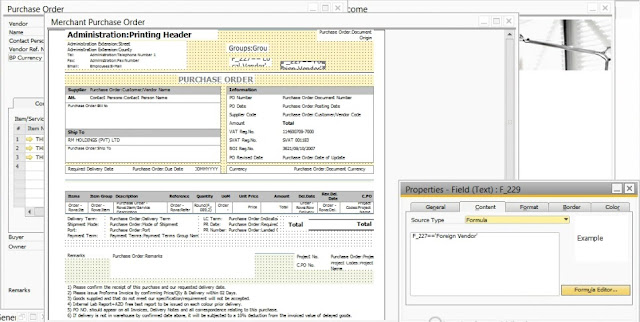
How to add "If" and "Else" conditional formula in PLD at SAP Business One ?

How to Create the PKCS12 file and including SSL Certificate and Key through OpenSSL

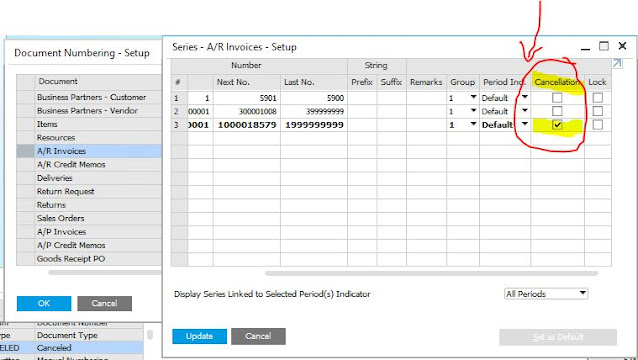
How to clearly identify the "Cancellation" document in SAP Business One